
How to Allocate Shared Expenses Between Your Companies
If you own more than one company, some costs don't belong to just one of them. The shop rent covers two businesses. The truck hauls for both. One payroll service runs everyone's checks. Each of those receipts has to be divided, and the hard part isn't the bookkeeping. It's deciding how much each company carries.
Most guides on this are written by CPA firms for large groups with dozens of entities. This one is for an owner with two, three, or four small companies who wants a method that is fair, simple, and easy to explain later.
First, make sure it's really shared
Before you allocate anything, ask whether only one company uses it. If so, it isn't shared. Charge 100% to that company and move on. Direct charges are always cleaner than allocations.
If you have a parent or overhead company that holds shared costs, sending the whole receipt there is a direct charge too. How (or whether) the overhead company then charges the operating companies is a separate question for you and your bookkeeper.
The four common methods
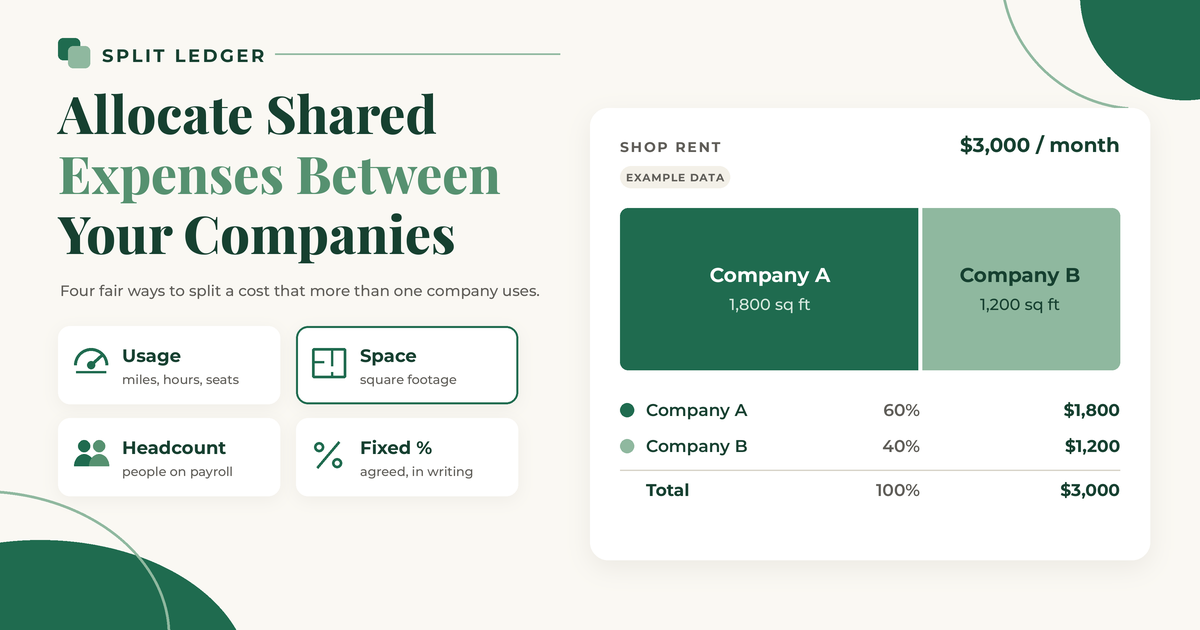
There are four ways most small owners divide a shared cost. Pick the one that matches what actually drives the cost.
1. Usage: miles, hours, or seats
Use this when you can measure how much each company used the thing. It fits vehicles, equipment, and software.
Example data only. A truck works for both companies. This month it drove 1,000 business miles: 750 for Company A and 250 for Company B. A $400 fuel receipt splits 75/25.
| Company | Miles | Share | Amount |
|---|---|---|---|
| Company A | 750 | 75% | $300 |
| Company B | 250 | 25% | $100 |
| Total | 1,000 | 100% | $400 |
A simple mileage log, kept in the truck or on your phone, is what makes this method hold up.
2. Space: square footage
Use this for rent, utilities, property insurance, and anything else tied to a building. Measure the area each company uses. Shared areas like a break room or a restroom can be left out of the count, which spreads them in the same ratio.
Example data only. A shop rents for $3,000 a month. Company A uses 1,800 square feet and Company B uses 1,200, for 3,000 square feet total.
| Company | Square feet | Share | Amount |
|---|---|---|---|
| Company A | 1,800 | 60% | $1,800 |
| Company B | 1,200 | 40% | $1,200 |
| Total | 3,000 | 100% | $3,000 |
Measure once, write it down, and reuse the same ratio every month until the layout changes.
3. Headcount: people on each payroll
Use this for costs that scale with people, like a payroll service, a shared HR tool, or safety training.
Example data only. A payroll service bills $240 a month and covers 12 employees: 7 in Company A and 5 in Company B.
| Company | Employees | Share | Amount |
|---|---|---|---|
| Company A | 7 | 7 of 12 | $140 |
| Company B | 5 | 5 of 12 | $100 |
| Total | 12 | 12 of 12 | $240 |
Use the count on a set day, such as the first of the month, so you aren't recounting every time someone is hired.
4. Fixed percent: an agreed split, in writing
Use this when nothing measurable fits, or when measuring would cost more time than it's worth. Phone plans, a shared accounting fee, or general office supplies are common examples.
Example data only. You decide a $500 monthly bookkeeping fee splits 70/30, because Company A has more than twice the transactions. Company A carries $350 and Company B carries $150.
The key word is "agreed." Write the percentage down, with a one-line reason, and apply it the same way every month. A fixed percent you change every time a bill arrives is not a method.
Three or more companies
Every method works the same way with more companies. Add up the total measure, then give each company its part of it.
Example data only. A $900 software plan has 9 seats: 4 for Company A, 3 for Company B, and 2 for the holding company. That's $400, $300, and $200.
When the amount doesn't divide evenly, round to the cent and put the leftover penny on one company, so the shares always add up to the receipt total. A $100 bill split three ways becomes $33.33, $33.33, and $33.34, not three entries of $33.33.
Rules that keep an allocation defensible
- Match the method to the cost. Space for rent, usage for vehicles, people for payroll costs. A method that has nothing to do with the cost is hard to explain.
- Be consistent. Use the same method for the same kind of cost, month after month. Change it when the facts change (a new lease, a new hire), not when one company needs a better month.
- Avoid the automatic 50/50. Two companies rarely use something equally. An even split is fine when it's true, but it shouldn't be the default you never check.
- Write it down. A short allocation policy, one line per type of cost, saves you from rebuilding your reasoning a year from now.
- Keep the receipt with every share. Each company's books should stand on their own. The IRS says supporting documents should show the payee, the amount, proof of payment, the date, and a description of what was bought. See the IRS page on what kind of records to keep.
Recording the shares
Once you know the amounts, each company records only its own share, with the receipt attached. If one company paid the whole bill, the others owe it their shares until you settle up. The post on splitting one receipt between two LLCs in QuickBooks Online walks through those entries step by step.
Doing the math is quick. Repeating it across several company files, every month, is where it gets tedious. I built Split Ledger for that, first for my brother, who runs several businesses. You snap a photo or upload a PDF, check what the AI read (vendor, date, total, and sales tax if you turn that on), and set each company's amount in whatever split your method gives you. Each share is filed to that company's QuickBooks Online as a purchase with the image attached, and a copy goes to your Google Drive under /Receipts/{Company}/{Year}/. Pick your parent or overhead company and the whole receipt goes there.
Split Ledger records each company's share. Which method you use, and how you settle the money between companies, is still a call for you and your bookkeeper.
Split Ledger is in free early access right now. You can sign up here.
This is general information, not tax or accounting advice. Check with your tax professional for your situation.
Split Ledger is not affiliated with or endorsed by Intuit or Google.