
Bookkeeping for Owners of Multiple Companies: A Practical Guide
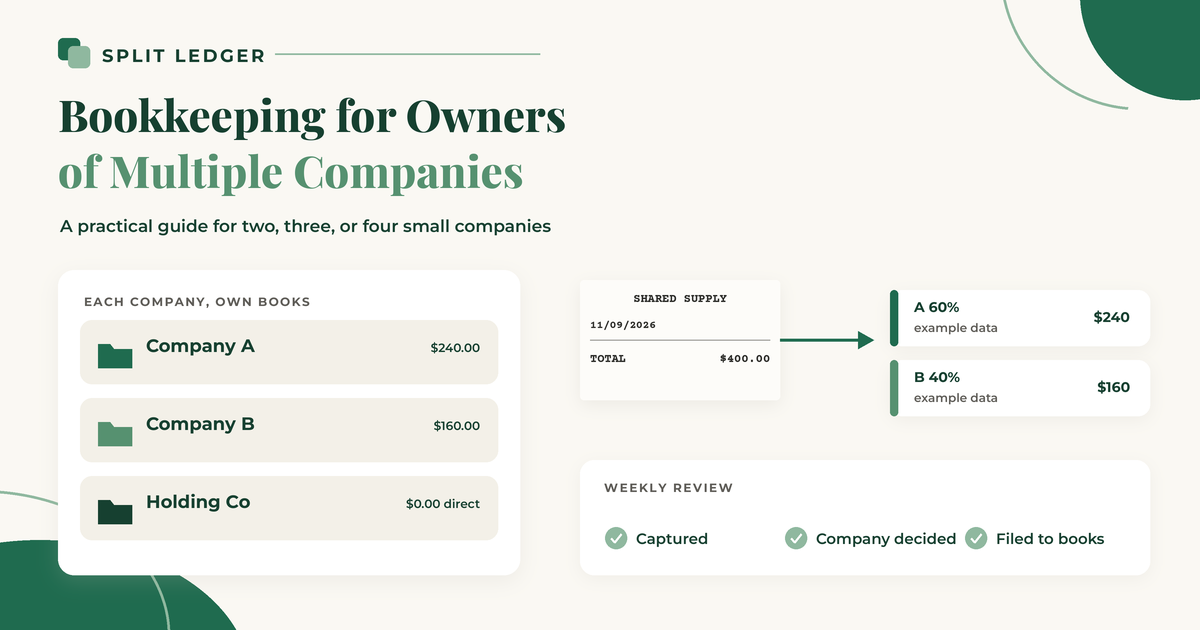
If you own two or more companies, bookkeeping is less about fancy reports and more about a few decisions you make over and over. Which company does this receipt belong to. How much of a shared cost each company carries. Where the image lives so each company's books can stand on their own.
This guide is for operators, contractors, and owners with a holding or overhead LLC. It is not a CPA firm handbook for a dozen entities. The goal is a routine you can keep up with on a busy week.
Start with separate books
Each company needs its own set of books. In QuickBooks Online, that means a separate company file and its own subscription, even when several companies share one sign-in. Intuit's page on adding another company file is clear: the data stays completely separate, users and bank connections are set up per company, and you switch companies to work in another one.
Classes and locations are a different tool. They split activity inside one company, not across legal entities. The post on multiple companies in QuickBooks Online: separate company files vs. classes and locations covers when each setup fits.
If you also have a parent or overhead company that holds shared costs, treat it as its own company file too. Sending a whole receipt there is a direct charge. How (or whether) that company later bills the operating companies is a question for you and your bookkeeper.
Capture every receipt the day you get it
Paper fades, gets left in a truck, and ends up in the wrong jacket. Take a photo or save the PDF the same day, in one place. A dedicated app, a scanner, or a single email address you forward digital receipts to all work. The method matters less than having exactly one inbox where every receipt starts.
The IRS says the rules for paper records apply to electronic records too, so a clear, readable image matters. See the IRS page on what kind of records to keep.
Decide the company at capture, not at month-end
This is the step that makes multiple companies manageable. When you take the photo, decide which company it belongs to. You remember why you bought it today. In six weeks, you will not.
Every receipt falls into one of three groups:
- One company. It goes 100% there.
- Shared. Split it in amounts that match how each company uses it. That is rarely 50/50.
- Parent or overhead company. If you have one that carries shared costs, the whole receipt can go there.
Write a one-line note on anything that is not obvious, such as "shop rent, 60/40 by floor space." The simple system for managing receipts across multiple businesses walks through this routine in more detail.
Split shared costs with a method you can explain
Shared costs are where multi-company books get messy. Shop rent, a truck that works for two businesses, one software bill used by three LLCs. Before you allocate anything, ask whether only one company uses it. If so, charge 100% to that company and move on.
When it really is shared, pick a method that matches what drives the cost:
- Usage (miles, hours, seats) for vehicles, equipment, and software.
- Space (square footage) for rent, utilities, and property insurance.
- Headcount for costs that scale with people, like a payroll service.
- Fixed percent when measuring would cost more time than it is worth, written down with a one-line reason.
Example data only. A truck drove 1,000 business miles this month: 750 for Company A and 250 for Company B. A $400 fuel receipt splits $300 / $100.
Be consistent. Use the same method for the same kind of cost, month after month. Change it when the facts change, not when one company needs a better month. The post on allocating shared expenses between your companies covers each method with worked examples.
Record each share in each company's books
A receipt in a folder is not bookkeeping yet. Each company's share still needs an entry in that company's accounting system, with the receipt image attached.
Because QuickBooks Online company files do not share transactions, a shared receipt means an entry in each file. The usual manual approach when one company paid the whole bill:
- Record the full receipt in the company that paid, with the image attached.
- Code the other company's share to an intercompany account (often called due from).
- Record that share in the other company's file, with the receipt attached there too.
- Settle up between the companies on a regular schedule.
The post on splitting one receipt between two LLCs in QuickBooks Online walks through those entries. Your bookkeeper may prefer a different setup, so ask before you start.
If almost every receipt belongs to one company, QuickBooks Online's own receipt capture may be enough. You snap or upload inside the company you are working in, then review and match. The post on QuickBooks receipt capture with several companies covers what it does and where it stops when a receipt belongs to more than one company.
File by company, then by year
Use the same folder structure for every company:
Receipts/
  Company A/
    2026/
  Company B/
    2026/
  Holding Co/
    2026/
Name files consistently, for example 2026-11-09_HomeDepot_142.18.pdf (date, vendor, amount). For shared receipts, save a copy in each company's folder so each company's records stand on their own. Do not mix in personal receipts.
Do a short weekly review
Once a week, take about 15 minutes and check three things:
- Every receipt from the week has been captured.
- Every receipt has a company (or a split) assigned.
- Every share has made it into the right company's books.
Also look for anything that landed in a catch-all category, such as Uncategorized Expense in QuickBooks Online, and move it. A small weekly pile is easy. A three-month pile across four companies is a lost weekend.
How long to keep the receipts
The IRS ties how long you keep records to the period of limitations for the return they support. The general rule is 3 years, with longer periods for unreported income, bad debts, employment taxes, and property. Your insurer or lender may ask you to keep records longer.
Separate books and separate tax returns are not the same thing. Many owners keep a clean set of books for each company even when one LLC is disregarded for tax and its activity is reported on another return. Retention still follows the return that includes those numbers, which may not be a separate filing for every LLC. How that applies to your entities is a question for your tax professional.
Hand off cleanly to your bookkeeper
If someone else closes your books, make their job boring. Give them each company's books (not one mixed pile), receipt images attached to the entries they support, a short note on how you split shared costs, and a weekly dump of anything still sitting in review. The comparison of receipt scanners for QuickBooks Online when you run more than one company can help if you are choosing a tool together.
Putting it together
Separate company files. Capture the same day. Decide the company right away. Split shared costs with a written method. Record each share in each company's books with the image attached. File by company and year. Review once a week.
I built Split Ledger for the capture-and-file part of this, first for my brother, who runs several businesses. You snap a photo or upload a PDF, check what the AI read (vendor, date, total, and sales tax if you turn that on), and choose which companies get it and how much each one carries, in any amounts. Each share is filed to that company's QuickBooks Online as a purchase with the image attached, and a copy goes to your Google Drive under /Receipts/{Company}/{Year}/. If you pick your parent or overhead company, the whole receipt goes there. Which allocation method you use, and how you settle money between companies, is still a call for you and your bookkeeper.
Split Ledger is in free early access right now. You can sign up here.
This is general information, not tax or accounting advice. Check with your tax professional for your situation.
Split Ledger is not affiliated with or endorsed by Intuit or Google.